It works great!
My wife and I both like to read. I recently got a Kindle, and Holly just had to have one too. One downside of e-books is that you can’t share a book with a friend. However, if two people can share one Amazon account (at least, just for Kindle purchases) , then they can share all their books between their two Kindle’s.
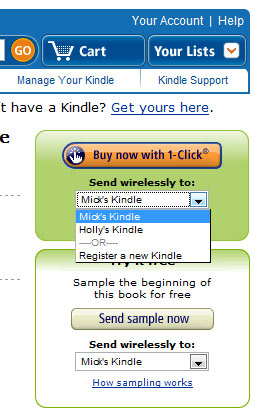 It works really simply, and really well. When you get the second Kindle, you just register it to the same account as the first one. Then when you buy a book, or download a sample, you get a drop-down box that lets you choose which Kindle you want the book sent to. In the image to the right I’ve selected “Mick’s Kindle”.
So it gets sent to whichever Kindle you like. There’s no option to send it to both Kindles, but once you’ve bought it, then it’s in your “Media Library” on Amazon, and from there you can send it again to either Kindle.
You can also buy books on the Kindle itself, and with that it works just as you would expect – the book goes to the Kindle you ordered it on, and to the Media Library, so it can be downloaded to either Kindle at a later time.
Finally you can also get a copy of the book on the other Kindle without using the computer. Just go to the “Content Manager” on the Kindle’s main menu. In the Content Manager, some books are labeled “Kindle”, meaning they are in your Kindle, and some are labeled “Amazon”, meaning they are just in your Media Store. If Holly buys a book, it will automatically show up here.
So, to download a book Holly just bought on her Kindle, I just select it in the Content Manager, and then select “Move to Kindle Memory” from the Menu. The book will transfer, and twenty seconds later you can start reading.
This all brings me to an unexpected advantage of the Kindle. We can read the same book at the same time. Normally you’d read a book and then lend it to someone. But since we have two Kindles, with two copies of the book (for less than the price of one paper book), we can both be reading it at the same time. We are currently both reading What is the What by Dave Eggers, and it’s a novel experience to be able to discuss the book while were are both still reading it.