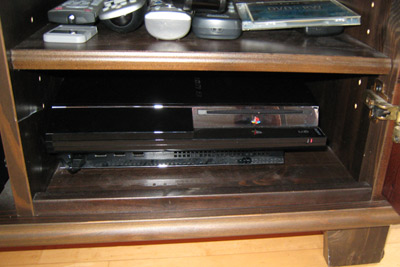
The Playstation 3 is a very powerful machine. So powerful that it needs a lot of electricity to run, and that means it produces lots of heat. It has a very efficient built-in fan to keep it from melting down, but when it gets too hot, the fan starts to run very fast, making a noise something like a small jet taking off.
My PS3 is in a cabinet with a glass door, and I use mostly for watching DVDs. If the door is closed, then the PS3 will overheat in about 30 minutes which makes it hard to hear, but if I leave the door open, then all is cool, except you can now hear the normal fan noise from the PS3. I did not like this state of affairs – for one thing I would forget, and half-way through watching a DVD I would hear this horrible high-pitched roar coming from the cabinet, and I’d have to either ignore it and hope it did not explode, or open the door and listen to it at full volume until it cooled down.

I could move the PS3, but there is really nowhere for it to go in a way that my wife would find aesthetically pleasing, so it’s kind of stuck there. Adding an aftermarket PS3 fan such as the “intercooler” is pointless, since the problem is the air inside the cabinet getting too hot, and having nowhere to go. The PS3 is quite capable of cooling itself, so long as it is “well ventilated”. So I decided what I needed to do was mod the cabinet by adding a cooling fan that would blow in cold air.
At first I was thinking some kind of PC fan, with an external power supply, but then I found the ideal solution: a USB powered fan. If it’s powered off the PS3’s USB port, then it would automatically switch on and off with the PS3.
A little searching led to the ideal fan, the Thermaltake Mobilefan II, a USB powered fan, with speed control, for the stunningly cheap price of $9.30 (plus shipping). (Note: don’t get the II+ version, as it has bright blue LEDs).
Here’s what my cabinet looks like, I’ve removed the top shelf, but you can see it’s pretty cramped. The PS3 has an intake on the back, and the hot air blows out the right side. So I keep it pushed against the left side of the cabinet, with as much space on the right as possible. It’s hardly surprising it overheats.

So first I plug the fan into the PS3, and switch it on. The fan starts and stops with the PS3, great! I note which way the air blows. I’d read somewhere that it’s better to blow cool air IN to a cabinet than to suck hot air out. Apparently this stops dust gathering in every air inlet hole as well. So I figure I’ll mount the fan in the back, pointing at the PS3’s air inlet. (But see later)
The fan is intended to be external, and so it comes with grill covers on both sides, and a little stand. The first thing I did was remove these, and then use the grill cover as a handy template to mark the mounting holes, and the circular outline of the fan.

I then drill those mounting holes, and drill holes around the edge of the fan outline, and punch out the middle. Not the neatest job, but it’s going to be covered by the fan. One thing to be careful here is cleaning up the edges. Excessively protruding pieces can mess with the fan blades. Just give it a spin manually to make sure nothing catches. This photo shows what it looked like just before I removed the middle piece.

I then mount the fan using the nuts and long bolts that came with the fan (that were holding on the covers). This was rather fiddly, and if the back of your cabinet is thicker then you might have to use screws.
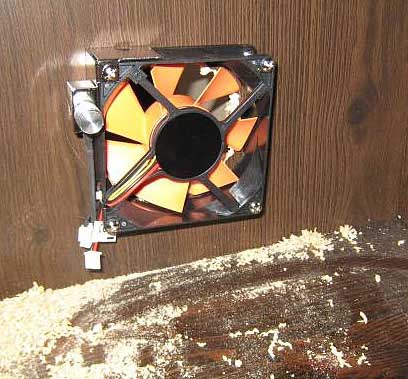
I clean up the dust, put the PS3 back, connect the fan’s supplied USB cable, and we are good to go!

The fan’s cable is actually very small and neat, being flat it can go underneath the PS3. The big cable above is the USB cable for charging the controllers. Note the position of the fan relative to the PS3. It’s blowing cold air right at it.
Results? It works! We watched three episodes of “Lost” with the door closed. I had the fan on the lowest setting at first, and it did seem to still be getting hot, so I turned it up at bit. The fan itself is silent at the lowest setting, but does get noisier at full power. But a fairly low power setting seems to work fine (I think the positioning of the fan relative to the PS3 is important here). With the door closed, the fan noise is not noticeable, and my PS3 can run forever.
[UPDATE] Since PS360 pointed out that the vents on the back are actually exhausts and not intakes, I’ve reversed the direction of the fan, so it now blows the air out of the cabinet. This seems to work very well, sucking out the hot air. While the blowing in cool air did work, I think it’s better this way around. You really have to consider the overall flow of air here, as PS360 says the intakes are actually on the front, with the exhausts on the side and back.
[UPDATE2 – after constructive feedback from the Playstation 3 forum] There was a photo that was not showing up in IE, which might explain the mixed opinions. I know it looks like it’s really cramped in there, but there are actually a couple of inches on the right, enough for the exhaust, and the vents at the back feed directly into the fan. I know it also looks dusty as well, that’s mostly from the flash, and it’s been cleaned since. The fan being bright orange is not an issue, as it sits at the back of the cabinet, and you can’t see it with the shelves in. Here’s what it actually looks like now (normally the door would be closed):